Toyota Corolla Cross: System Diagram
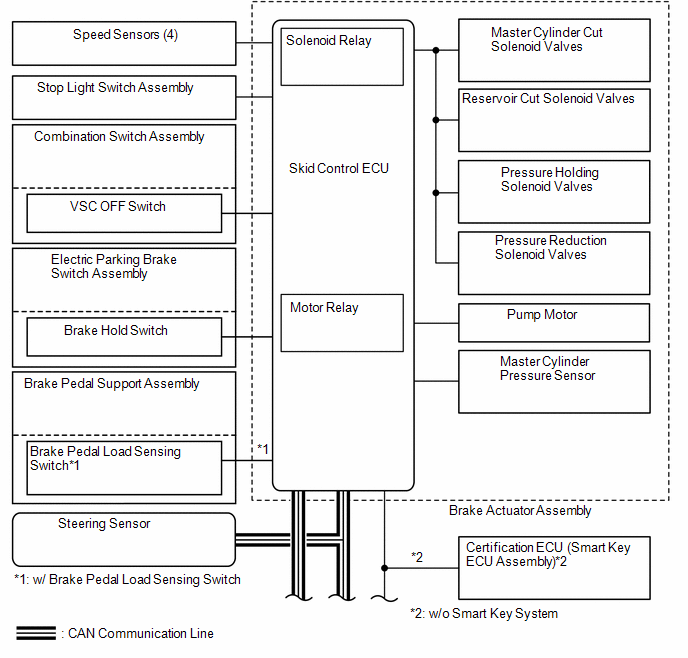
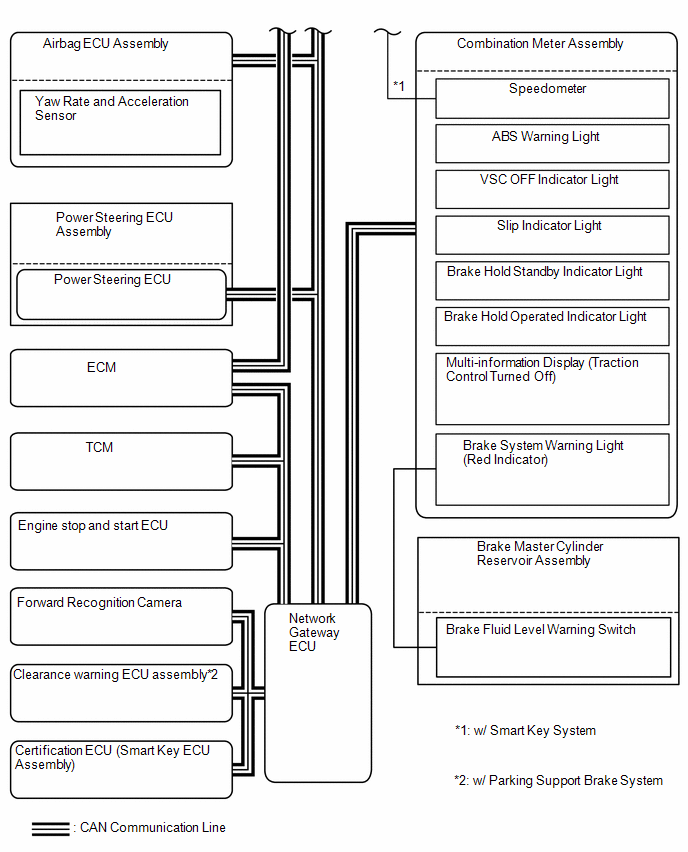
SYSTEM DIAGRAM
READ NEXT:
CAUTION / NOTICE / HINT
HINT:
*: Use the GTS.
PROCEDURE
1.
VEHICLE BROUGHT TO WORKSHOP
NEXT
TEST MODE PROCEDURE
SENSOR CHECK USING DEALER MODE (SIGNAL CHECK)
NOTICE:
After replacing or removing and installing a speed sensor, perform Dealer
Mode (Signal Check) inspection to confirm
UTILITY
DESCRIPTION
(a) Refer to the table below and then perform the necessary operation
according to the part to be replaced in order to perform calibration.
Parts to be Replaced / O
SEE MORE:
DESCRIPTION This DTC is stored when a malfunction in the ACC output circuit is detected. The ACC output circuit is the circuit between terminal ACCD of the certification ECU (smart key ECU assembly) and the ACC relay.
DTC No. Detection Item
DTC Detection Condition Trouble Area
No
DTC SUMMARY MALFUNCTION DESCRIPTION This DTC indicates that magnetic force deterioration of the permanent magnet located in the rotor inside the generator (MG1) has been detected. The cause of this malfunction may be one of the following:
Area Main Malfunction Description
Inverter

 How To Proceed With Troubleshooting
 ACC Circuit Short to Ground (B227411)
