Toyota Corolla Cross: Inspection
INSPECTION
PROCEDURE
1. INSPECT REAR LIGHT LENS AND BODY LH (for LED Type Clearance Light)
(a) Check that the rear light lens and body LH.
| (1) Apply auxiliary battery voltage to the rear light lens and body LH and check that the light comes on.
OK: |
Tester Connection | Specified Condition | |
U44-1 (B) - Auxiliary battery positive (+) U44-2 (E) - Auxiliary battery negative (-) |
Tail light comes on | If the result is not as specified, replace the rear light lens and body LH. |
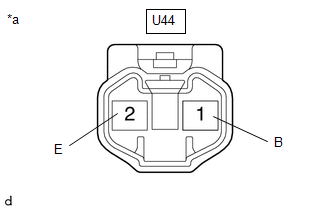 |
|
*a | Component without harness connected
(Rear Light Lens and Body LH) | | |
2. INSPECT REAR LIGHT LENS AND BODY RH (for LED Type Clearance Light)
(a) Check that the rear light lens and body RH.
| (1) Apply auxiliary battery voltage to the rear light lens and body RH and check that the light comes on.
OK: |
Tester Connection | Specified Condition | |
U43-1 (B) - Auxiliary battery positive (+) U43-2 (E) - Auxiliary battery negative (-) |
Tail light comes on | If the result is not as specified, replace the rear light lens and body RH. |
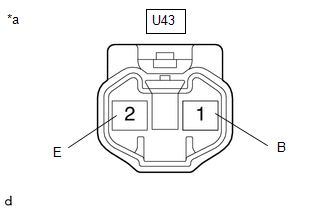 |
|
*a | Component without harness connected
(Rear Light Lens and Body RH) | | |
READ NEXT:
REASSEMBLY CAUTION / NOTICE / HINT COMPONENTS (REASSEMBLY)
Procedure Part Name Code
1 BACK UP LIGHT BULB
81550N -
- -
2 BACK UP LIGHT SOCKET
INSTALLATION CAUTION / NOTICE / HINT COMPONENTS (INSTALLATION)
Procedure Part Name Code
1 REAR LIGHT ASSEMBLY
81590A -
- -
2 BACK DOOR TRIM PANE
On-vehicle InspectionON-VEHICLE INSPECTION PROCEDURE
1. INSPECT HEADLIGHT RELAY LH (a) Check the operation of the headlight relay LH.
(1) Measure the resistance according to the value(s) in the
SEE MORE:
INSTALLATION CAUTION / NOTICE / HINT COMPONENTS (INSTALLATION)
Procedure Part Name Code
1 REAR SEAT INNER BELT ASSEMBLY
73580B
- -
2 REAR SEAT CUSHION LOCK HOOK
72693 -
- -
3 BENCH TYPE REAR SEAT CUSHIO
REMOVAL
CAUTION / NOTICE / HINT
COMPONENTS (REMOVAL)
Procedure
Part Name Code
1
FRONT WHEELS
-
-
-
-
2
NO. 1 ENGINE UNDER COVER ASSEMBLY