Toyota Corolla Cross: System Diagram
SYSTEM DIAGRAM
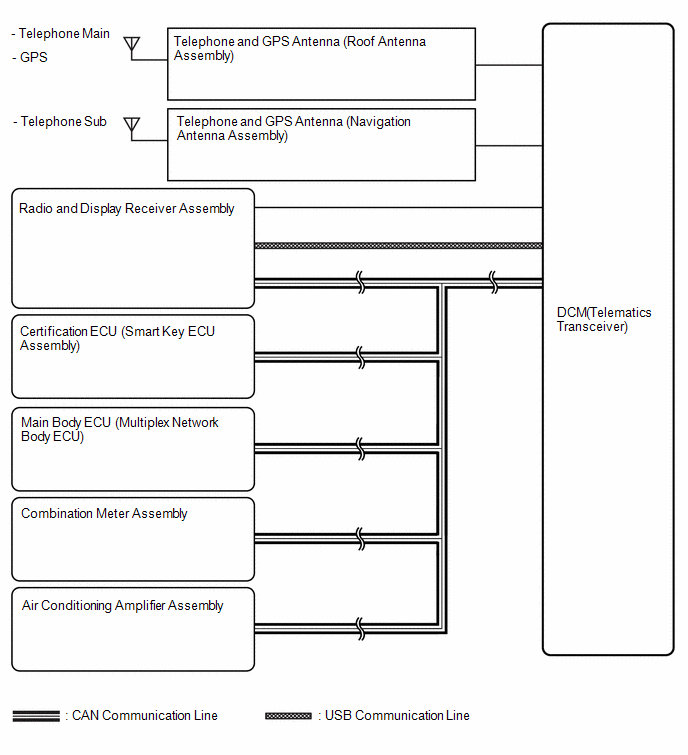
READ NEXT:
SYSTEM DESCRIPTION
OUTLINE
(a) Remote Connect, which enables the user to check the vehicle
status and operate the vehicle from a remote location, has been used.
(b) Remote Connect is available by
CAUTION / NOTICE / HINT
HINT:
Use the following procedure to troubleshoot the telematics system.
*: Use the GTS.
PROCEDURE
1.
VEHICLE BROUGHT TO WORKSHOP
OPERATION CHECK
HINT:
This function shows the telematics network status when the DCM (telematics
transceiver) was operated. Use this when no DTC is present but this telematics
system was
SEE MORE:
DESCRIPTION The illuminated entry system controls the push start switch illumination. WIRING DIAGRAM
for HEV Model for Gasoline Model
CAUTION / NOTICE / HINT
NOTICE: Before replacing the certification ECU (smart key ECU assembly), refer to Registration.*1
for HEV Model: Click here for Ga
DTC SUMMARY MALFUNCTION DESCRIPTION The hybrid vehicle control ECU detects a VH sensor malfunction.
The cause of this malfunction may be one of the following: Inverter voltage sensor internal circuit malfunction
Voltage sensor malfunction
Motor generator control ECU (MG ECU) malfuncti

 System Description
 Push Start Switch Illumination Circuit
