Toyota Corolla Cross Owners & Service Manuals

Toyota Corolla Cross: Unlock Warning Switch

Removal

REMOVAL

CAUTION / NOTICE / HINT

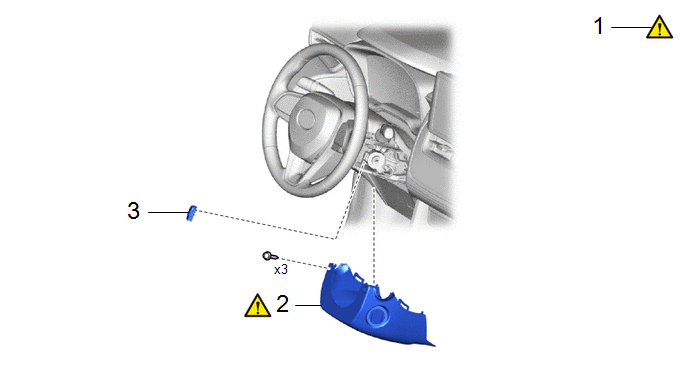
COMPONENTS (REMOVAL)
Procedure

Part Name Code

1

STEERING WHEEL POSITION

-

-

-

2

LOWER STEERING COLUMN COVER

45287

-

-

3

UNLOCK WARNING SWITCH ASSEMBLY

84052

-

-

-

PROCEDURE

1. ADJUST STEERING WHEEL POSITION

Click here

2. REMOVE LOWER STEERING COLUMN COVER

Click here

3. REMOVE UNLOCK WARNING SWITCH ASSEMBLY

Inspection

INSPECTION

PROCEDURE

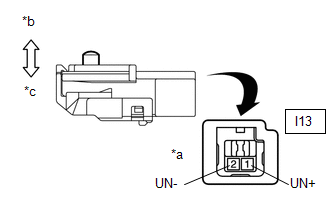
1. INSPECT UNLOCK WARNING SWITCH ASSEMBLY

(a) Measure the resistance according to the value(s) in the table below.

Standard Resistance:

Tester Connection

Condition

Specified Condition

I13-1 (UN+) - I13-2 (UN-)

Switch not pushed (Key removed)

10 kΩ or higher

I13-1 (UN+) - I13-2 (UN-)

Switch pushed (Key inserted)

Below 1 Ω

If the result is not as specified, replace the unlock warning switch assembly.

*a

Component without harness connected

(Unlock Warning Switch Assembly)

*b

Switch not pushed

*c

Switch pushed

Installation

INSTALLATION

CAUTION / NOTICE / HINT

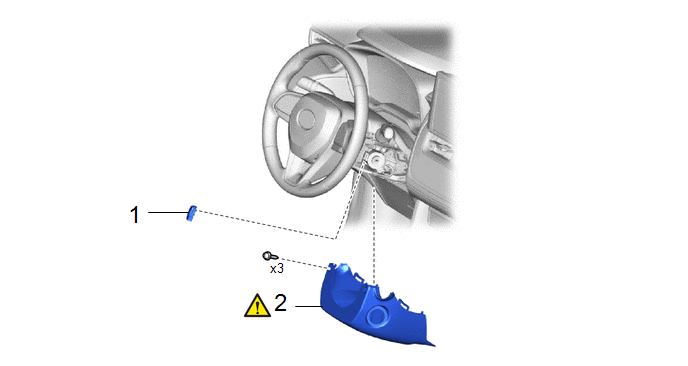
COMPONENTS (INSTALLATION)
Procedure

Part Name Code

1

UNLOCK WARNING SWITCH ASSEMBLY

84052

-

-

-

2

LOWER STEERING COLUMN COVER

45287

-

-

PROCEDURE

1. INSTALL UNLOCK WARNING SWITCH ASSEMBLY

2. INSTALL LOWER STEERING COLUMN COVER

Click here

    READ NEXT:

     Wireless Door Lock Buzzer

    RemovalREMOVAL CAUTION / NOTICE / HINT COMPONENTS (REMOVAL) Procedure Part Name Code 1 FRONT WHEEL LH - - - - 2 FRONT FENDER MOULDING S

     Wireless Door Lock Control System (w/ Smart Key System)

     Precaution

    PRECAUTION PRECAUTIONS WHEN USING GTS (a) When using the GTS with the ignition switch off, connect the GTS to the DLC3 and turn a courtesy light switch on and off at intervals of 1.5 seconds or less u

    SEE MORE:

     Problem Symptoms Table

    PROBLEM SYMPTOMS TABLE HINT: Use the table below to help determine the cause of problem symptoms. If multiple suspected areas are listed, the potential causes of the symptoms are listed in order of probability in the "Suspected Area" column of the table. Check each symptom by

     Odometer and trip meter display

    ■ Changing the display Press the display change button until the desired item is displayed. ■ Display items Odometer Displays the total distance the vehicle has been driven. Trip meter A/Trip meter B Displays the distance the vehicle has been driven since the meter was last reset. Trip me

    © 2020-2026 Copyright www.tcorollacross.com PT NL